
Methodology
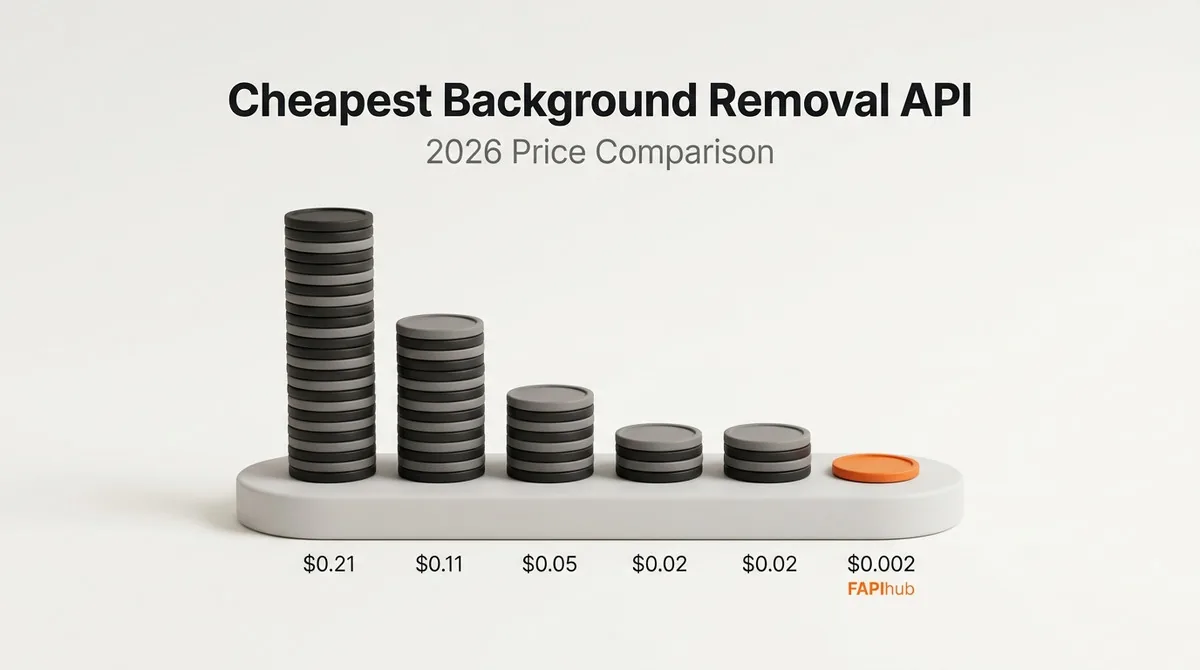
We compared publicly listed pricing pages (checked October 2026) and normalized each provider to the cheapest plan or credit pack that covers 7,000 images a month. We also included whether a provider offers public API access and what its free tier includes.
Full comparison table
| Provider | Cost/image at 7,000/mo | Free tier | Public API |
|---|---|---|---|
| remove.bg | $0.1127 | 50 calls/mo at preview resolution | Yes |
| PhotoRoom | $0.0200 | 10 calls on signup | Yes |
| Clipdrop | $0.2057 | 100 one-time credits | Yes |
| Removal.ai | $0.0514 | 10 low-resolution previews/mo | Yes |
| Erase.bg | $0.0200 | 3 credits | Yes (via PixelBin, $0.04–$0.07/image) |
| FAPIhub | $0.00214 | 100/mo, full resolution | Yes |
What the per-image number does not tell you
A single cost-per-image figure is a useful starting point, but the pricing model behind it often matters as much as the headline rate. Before you pick a provider, check these details on each pricing page:
- Free tier resolution. remove.bg's free API calls are at preview resolution, and Removal.ai's free previews are low resolution. That is fine for checking that the integration works, but not for judging production quality. FAPIhub's 100 free requests per month are full resolution.
- Minimum purchase size. PhotoRoom is sold in prepaid 1,000-image monthly blocks, so even 100 images costs $20, and unused images do not roll over. If your volume is small or uneven, the effective price per image can be much higher than $0.02.
- Expiry. Clipdrop credits stay valid for 2 years. FAPIhub per-usage requests never expire. Monthly plans on any provider reset each billing period.
- Feature tiers. Some providers charge more for extras. PhotoRoom's AI-generated backgrounds require its Plus plan at $0.10/image. On FAPIhub, the mask, blur, color, gradient, and shadow endpoints are on every plan at the same per-request price.
- What counts as a billable request. On FAPIhub, server-side 5xx errors are never counted against your quota. Successful requests and 4xx client errors are counted.
Best for different use cases
- Best for high volume: FAPIhub (the Mega plan brings the price down to $0.00078/image)
- Best free tier for API users: FAPIhub
- Best for occasional use without a subscription: FAPIhub per-usage packs, from $10 for 1,000 requests that never expire
When pricing is the deciding factor, FAPIhub is consistently the lowest-cost API in this comparison. Each provider has a dedicated comparison page with migration notes: remove.bg, PhotoRoom, Clipdrop, Removal.ai, Erase.bg, and Slazzer.
FAPIhub cost at every volume
Seven thousand images a month is one data point. This table shows the cheapest FAPIhub option at other volumes, using only the published plan prices. Per-image cost is the plan price divided by the images you actually process, so it drops as you fill a plan.
| Images per month | Cheapest option | Cost | Cost per image |
|---|---|---|---|
| 100 | Basic (free) | $0 | $0 |
| 1,000 | Per Usage pack | $10 one-time | $0.0100 |
| 5,000 | Pro | $15/month | $0.0030 |
| 7,500 | Pro | $15/month | $0.0020 |
| 20,000 | Ultra | $79/month | $0.0040 |
| 52,000 | Ultra | $79/month | $0.0015 |
| 100,000 | Mega | $199/month | $0.0020 |
| 255,000 | Mega | $199/month | $0.00078 |
Two things stand out. First, the per-image price is lowest when you are near the top of a plan, so it is worth checking your actual usage before upgrading. Second, even the least efficient point in the table, 20,000 images on Ultra at about $0.004/image, is still below every other provider's rate at 7,000 images in the comparison above.
Per Usage or Pro: the break-even point
Per-usage packs cost $10 for 1,000 requests, which is $0.01 per request. Because those requests never expire, leftovers carry into the next month, so your effective cost is roughly $0.01 times the images you process. Pro costs $15 a month for up to 7,500 requests.
- Below about 1,500 images a month on average: per-usage packs are cheaper, and you are not paying for months with no activity.
- At about 1,500 images a month: the two cost the same, $15.
- Above 1,500 images a month, every month: Pro is cheaper, and it gets more so the closer you get to 7,500.
Seasonal businesses are the main exception. If you process 6,000 images in one busy month and almost nothing the rest of the year, six $10 packs ($60 total) can cost less than twelve months of Pro ($180). Run the numbers with your own history.
How to estimate your monthly volume
Most teams underestimate volume because they count products, not API calls. A quick estimate:
- Start with new images. New SKUs or uploads per month, times images per item. For example, 300 new products with 4 photos each is 1,200 images.
- Add variants. If you produce a transparent PNG and a white-background version of each photo, that is two requests per photo, because each endpoint call is one request.
- Add reprocessing. Reshoots, retouching, and quality reruns with a different
modeleach cost a request. Budget a margin of 10% to 20% until you have real numbers. - Add test traffic. Staging environments and CI tests that call the real API count too. Use a separate key so you can see that usage on its own.
Using the example above, 1,200 photos with two variants each is 2,400 requests, plus a 20% margin is about 2,900 requests a month. That fits comfortably in Pro at $15, or about $0.005 per request.
Keep the cheapest API cheap
A low list price only helps if you are not wasting requests. A few habits keep usage predictable:
- Validate before uploading. 4xx errors count, so reject files that are not JPEG, PNG, WebP, BMP, or GIF, or that are over 10 MB, before they reach the API.
- Cache results. Key outputs by a hash of the input bytes and endpoint options so the same photo is never processed twice.
- Retry the right errors. Retry 429 after the
Retry-Afterdelay and 5xx with backoff, which is free. Do not retry 400 or 401. - Watch the 402. A 402
insufficient_creditsresponse means the quota is used up. Alert on it so a busy month does not silently stop your pipeline.
The production best practices guide covers caching and retries in more depth, and the 2026 API comparison looks beyond price at developer experience and stability.
Frequently asked questions
What is the cheapest background removal API for small volumes?
Under 100 images a month, FAPIhub's Basic plan is free at full resolution with no credit card. For occasional use above that, per-usage packs cost $10 for 1,000 requests that never expire.
Is a cheaper API lower quality?
Price and quality are separate questions, and the only reliable answer is to test on your own images. Run the same set through each provider's free tier and compare. You can also see sample outputs on the comparison page.
Do extra endpoints like shadows or colored backgrounds cost more?
No. On FAPIhub, mask, blur, color, gradient, and shadow are on every plan at the same per-request price. AI-generated backgrounds are included on the Mega plan.
What happens if I go over my monthly quota?
Requests return 402 insufficient_credits until you upgrade or the next billing period starts. Plan for peak months, not average ones.
Current plan details are always on the pricing section.