
Executive summary
All four providers can remove backgrounds effectively. The biggest differences are economics and integration flexibility.
Price comparison
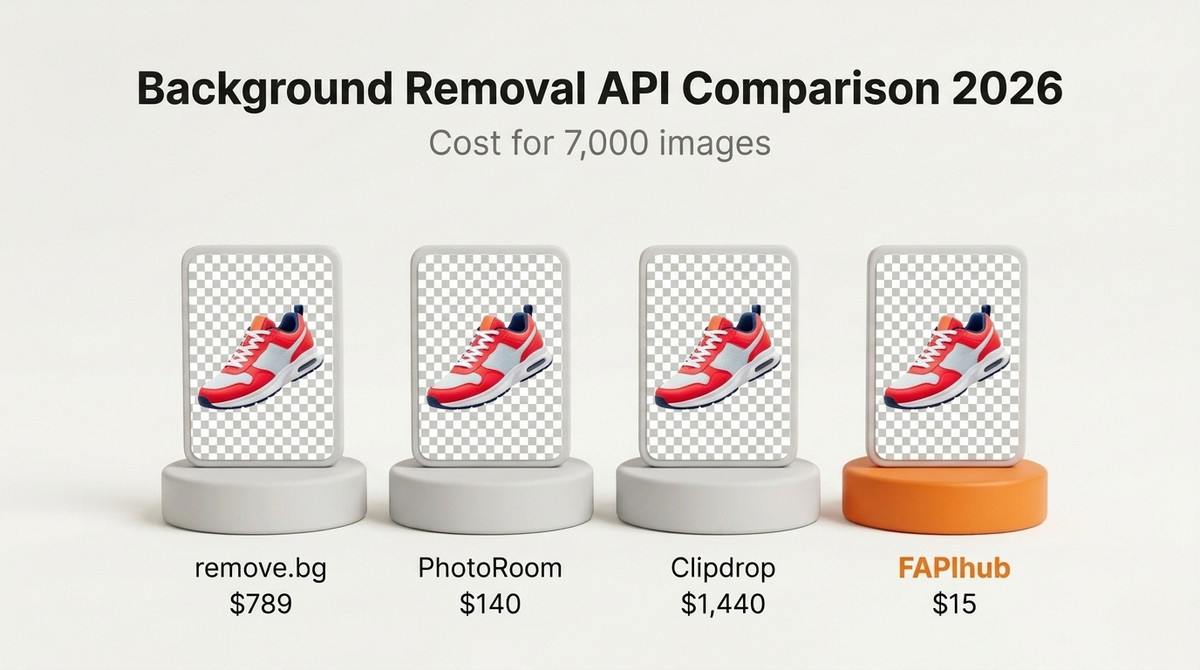
| Provider | 7,000 images | Cost/image | Notes |
|---|---|---|---|
| remove.bg | $789.00 | $0.1127 | High quality, costly at scale |
| PhotoRoom | $140.00 | $0.0200 | Sold in 1,000-image monthly blocks |
| Clipdrop | $1,440.00 | $0.2057 | Prepaid credit packs, valid for 2 years |
| FAPIhub | $15.00 | $0.00214 | Lowest cost in this set |
Prices are the cheapest plan or credit-pack combination covering 7,000 images a month, taken from public pricing pages in October 2026.
remove.bg — Market leader, premium priced
remove.bg has the strongest brand recognition in this category and has been a default choice since it launched in 2018. The API is well documented and reliable. The free tier of 50 API calls per month (at preview resolution) is useful for initial testing. The problem is cost at production volume: 7,000 images a month requires the $789 plan, and 50,000 images costs $3,950. For teams where image volume is significant, this is the primary reason to look elsewhere. See the remove.bg alternative breakdown for pricing at every volume tier.
PhotoRoom — Competitive for basic removal, expensive for features
PhotoRoom's Basic plan at $0.02/image is the second cheapest in this comparison for plain background removal. However, it is sold in prepaid 1,000-image monthly blocks, so even 100 images costs $20, and unused images do not roll over. AI-generated backgrounds require PhotoRoom's Plus plan at $0.10/image, which is 5x the Basic price and makes PhotoRoom significantly more expensive for teams that need those features. More detail is in the PhotoRoom alternative comparison.
Clipdrop — Prepaid credits, ownership changes
Clipdrop sells prepaid credit packs that work out to $0.144–$0.50 per image depending on pack size, which makes it the most expensive option here at 7,000 images a month. Credits stay valid for 2 years, and the developer experience is straightforward. The concern for production integrations is platform stability: Clipdrop was acquired by Stability AI in 2023 and then by Jasper in 2024. Two ownership changes in about a year create real uncertainty about long-term API stability, pricing, and support for teams building on it. See the Clipdrop alternative comparison for a migration guide.
FAPIhub — Lowest cost, broadest background options
At $0.00214/image on the Pro plan, FAPIhub is roughly 9x–96x cheaper than the three providers above at 7,000 images a month. Beyond transparent removal, the API includes mask, blur, solid color, gradient, shadow, and AI-generated background endpoints, all at the same per-request price. There is no separate pricing tier for custom backgrounds. The free tier of 100 full-resolution requests per month is also the most generous in this comparison for actual integration testing. You can check output quality yourself on the side-by-side result comparison.
Pricing models compared
The 7,000-image table hides an important difference: each provider charges in a different way. That affects what you pay in slow months and how much unused capacity you lose.
| Provider | How you pay | Unused capacity | Free tier |
|---|---|---|---|
| remove.bg | Monthly credit plans, about 10% less on annual billing | Check current plan terms | 50 calls/mo at preview resolution |
| PhotoRoom | Prepaid 1,000-image monthly blocks | Does not roll over | 10 calls on signup |
| Clipdrop | Prepaid credit packs | Valid for 2 years | 100 one-time credits |
| FAPIhub | Monthly plans, or one-time per-usage packs | Per-usage requests never expire | 100/mo at full resolution |
If your volume is steady, a monthly plan is usually the simplest choice. If it is seasonal or unpredictable, capacity that does not expire matters more than the headline rate.
Cost at different volumes
Using the cheapest plan that covers each volume on each provider's public pricing page:
| Monthly volume | remove.bg | PhotoRoom | FAPIhub |
|---|---|---|---|
| 100 images | $39 | $20 | $0 (Basic) |
| 1,000 images | $189 | $20 | $10 (Per Usage, one-time) |
| 7,000 images | $789 | $140 | $15 (Pro) |
| 50,000 images | $3,950 | $1,000 | $79 (Ultra) |
Clipdrop is left out of this table because its cost depends on which credit pack combination you buy; at 7,000 images it is the most expensive option in this comparison. Over a year at 7,000 images a month, FAPIhub Pro costs $180, compared with $9,468 on remove.bg's monthly plan. At 50,000 images, Ultra costs $948 a year. For the highest volumes, Mega covers 255,000 requests for $199 a month, about $0.00078/image. The cheapest background removal API breakdown adds Removal.ai, Erase.bg, and Slazzer.
How to run your own evaluation
Pricing is easy to compare from public pages. Quality and speed are not, because they depend on your images and your infrastructure. A fair test takes an afternoon:
- Build a representative test set. Collect 50 to 100 real images from your workload. Include the difficult ones: hair and fur, transparent or reflective objects, thin details, busy backgrounds, and subjects close in color to the background.
- Use each free tier. remove.bg's 50 monthly calls are at preview resolution, PhotoRoom gives 10 calls on signup, Clipdrop gives 100 one-time credits, and FAPIhub gives 100 full-resolution requests a month. Note which free tiers let you judge full-resolution output.
- Review results blind. Rename outputs so reviewers do not know which provider produced them, then score edges, missed areas, and leftover background.
- Measure latency from your own servers. Response times depend on image size and network path, so time requests from the region where your code will run.
- Test failure paths. Send an invalid file, a wrong key, and a burst of requests. Check that each provider's errors are easy to handle in code.
- Price your real volume. Multiply your monthly requests, including every variant and rerun, by each provider's plan structure, not just the headline rate.
On FAPIhub, if an image looks wrong, rerun it with model=aurora or model=ghost and keep whichever looks best on your images. You can also run the whole test in the playground before writing any code.
Which should you choose?
For most developers and teams, the choice comes down to volume and feature needs. If you are processing under 50 images per month, the price difference is small, so use whichever provider has the features you need. If you are processing 1,000 images or more per month, the cost difference becomes significant and FAPIhub is the clear winner on economics. Note that the public FAPIhub API processes still images (JPEG, PNG, WebP, BMP, and GIF). Video background removal is available on custom enterprise plans.
Developer experience
Migration effort is low because all providers use similar multipart upload patterns. For teams already using one API, swapping endpoint and auth header usually completes the migration.
Integration details that matter in production
Once the endpoint and header are swapped, the remaining work is error handling and retries. These are the FAPIhub behaviors to build around:
- Direct image response. A successful call returns the PNG bytes in the response body, with transparency preserved. There is no JSON wrapper or second download step.
- Consistent errors. Failures return
{"error": {"code": "...", "message": "...", "request_id": "..."}}with status 400invalid_image, 401invalid_api_key, 402insufficient_credits, or 429rate_limit_exceeded. - Rate limits with a hint. 429 responses include a
Retry-Afterheader, so your client knows exactly how long to wait. - Free server errors. 5xx responses are never counted against your quota, so retrying them with backoff costs nothing. Successful requests and 4xx errors do count.
- One pattern for every endpoint. Mask, blur, color, gradient, and shadow use the same multipart upload with an extra form field or two.
To keep switching cheap in the future, put the provider behind a single function in your code:
import os
import requests


def remove_background(image_bytes: bytes) -> bytes:
    response = requests.post(
        "https://fapihub.com/v2/rembg/",
        headers={"ApiKey": os.environ["FAPIHUB_API_KEY"]},
        files={"image": ("upload", image_bytes)},
        timeout=60,
    )
    if response.status_code != 200:
        error = response.json().get("error", {})
        raise RuntimeError(f"{response.status_code} {error.get('code')}: {error.get('message')}")
    return response.content
The rest of your application only calls remove_background(). If you ever need to change providers again, you touch one function. Language-specific versions are in the Python and Node.js guides.
Final verdict
If your primary KPI is cost per processed image without sacrificing API workflow simplicity, FAPIhub is the clear winner in 2026 pricing benchmarks.
Frequently asked questions
Which background removal API is the cheapest in 2026?
In this comparison, FAPIhub is the lowest cost at every volume we priced: $15 for 7,000 images a month on Pro, versus $140 on PhotoRoom, $789 on remove.bg, and $1,440 on Clipdrop.
Which API has the best quality?
All four providers remove backgrounds effectively, and the differences depend heavily on your images. Test on your own image set using each free tier, or compare sample outputs on the comparison page.
Do AI-generated backgrounds cost extra?
On PhotoRoom they require the Plus plan at $0.10/image. On FAPIhub, AI background generation is included on the Mega plan, and the mask, blur, color, gradient, and shadow endpoints are on every plan at the same per-request price.
How hard is it to switch providers?
Usually a few lines: change the endpoint URL, the auth header, and the file field name. The remove.bg migration guide shows the exact changes.
Can any of these APIs process video?
FAPIhub's public API handles still images. Video background removal is available on custom enterprise plans; contact support@fapihub.com for details.